Hi all,
I have good news. I tried to run XGL on my machine since I installed Mandriva 2007.0, I have followed a lot of guides but no way.
I got it installing compiz-quinnstorm
urpmi cgwd csm cgwd-themes cgwd-themes-extra compiz-manager
Then, in /etc/sysconfig/compiz set COMPIZ=yes and /etc/system/xgl set XGL=yes
Restart your X server, it should start XGL and Compiz
I did in this way cause I had problem with Cube plugin; remember quinnstorm is a developer version not the stable one.
....
ADD SOME PHOTO.
....
Enjoy.
Friday, October 27, 2006

Upgrading Mandriva 2006 to Mandriva 2007
Simple:
1) download the iso image of Mandriva 2007.0 and create a bootable DVD
2) select upgrade during the installation process
3) get a big cup of coffe
4) Enjoy.
The process is not so smooth but at the end works.
Y'll probably get problems with Xorg.
First of all you must update your urpmi.cfg, that's mine:
2007Main ftp://ftp.proxad.net/pub/Distributions_Linux/Mandrake/official/2007.0/i586/media/main/release {
hdlist: hdlist.2007Main.cz
key-ids: 70771ff3
update
with_hdlist: media_info/hdlist.cz
}
2007Contrib ftp://ftp.proxad.net/pub/Distributions_Linux/Mandrake/official/2007.0/i586/media/contrib/release {
hdlist: hdlist.2007Contrib.cz
key-ids: 78d019f5
update
with_hdlist: media_info/hdlist.cz
}
2007PlfNonFree ftp://ftp.cica.es/mirrors/Linux/plf/mandrake/2007.0/non-free/release/binary/i586 {
hdlist: hdlist.2007PlfNonFree.cz
key-ids: caba22ae
with_hdlist: ./hdlist.cz
}
2007PlfFree ftp://ftp.cica.es/mirrors/Linux/plf/mandrake/2007.0/free/release/binary/i586 {
hdlist: hdlist.2007PlfFree.cz
key-ids: caba22ae
update
with_hdlist: ./hdlist.cz
}
urpmi.update -a
urpmi --auto-select
The upgrade procedure make some mistake, cause it leaves some old package so, you must clean your system by hand , for example in my case I had to uninstall all gnome 2.10 libraries.
1) download the iso image of Mandriva 2007.0 and create a bootable DVD
2) select upgrade during the installation process
3) get a big cup of coffe
4) Enjoy.
The process is not so smooth but at the end works.
Y'll probably get problems with Xorg.
First of all you must update your urpmi.cfg, that's mine:
2007Main ftp://ftp.proxad.net/pub/Distributions_Linux/Mandrake/official/2007.0/i586/media/main/release {
hdlist: hdlist.2007Main.cz
key-ids: 70771ff3
update
with_hdlist: media_info/hdlist.cz
}
2007Contrib ftp://ftp.proxad.net/pub/Distributions_Linux/Mandrake/official/2007.0/i586/media/contrib/release {
hdlist: hdlist.2007Contrib.cz
key-ids: 78d019f5
update
with_hdlist: media_info/hdlist.cz
}
2007PlfNonFree ftp://ftp.cica.es/mirrors/Linux/plf/mandrake/2007.0/non-free/release/binary/i586 {
hdlist: hdlist.2007PlfNonFree.cz
key-ids: caba22ae
with_hdlist: ./hdlist.cz
}
2007PlfFree ftp://ftp.cica.es/mirrors/Linux/plf/mandrake/2007.0/free/release/binary/i586 {
hdlist: hdlist.2007PlfFree.cz
key-ids: caba22ae
update
with_hdlist: ./hdlist.cz
}
urpmi.update -a
urpmi --auto-select
The upgrade procedure make some mistake, cause it leaves some old package so, you must clean your system by hand , for example in my case I had to uninstall all gnome 2.10 libraries.
Friday, February 24, 2006
WPA
I bought an access point and I configured it with a WPA-PSK-TKIP.
I know that my wireless card works because in US I used it with an open wireless-netwok.
A) install the wpa manager:
A.1) urpmi wpa_supplicant
B) Open Wireless Configuration:
B.1) select your network
B.2) select WPA
B.3) insert your key
enjoy your freedom
I know that my wireless card works because in US I used it with an open wireless-netwok.
A) install the wpa manager:
A.1) urpmi wpa_supplicant
B) Open Wireless Configuration:
B.1) select your network
B.2) select WPA
B.3) insert your key
enjoy your freedom
Friday, December 16, 2005
From Mandriva 2005 LE to 2006 Free
Hi Guys, yesterday I have decided to upgrade my 2005 LE to 2006 Free.
I had some problem but now all the system seems to be stable.
Get urpmi's repositories of Mandriva 2006 Free Edition, as usual, from http://easyurpmi.zarb.org/.
Before you do anything reads this note Mandriva 2006.0 release notes.
update your urpmi database, and then type:
urpmi --auto-select
I suggest you to use the option "--test" before the main upgrade to check if there are dependencies' problems.
At this point you Xorg will not have 3D, you can enable it following this process:
OpenOffice:
Urpmi --auto-select has installed OpenOffice 1.1.5 but Mandriva has the version 2.0, the package name is: openoffice.org-go-ooo
Note: Some days ago I installed the SUN's JRE, yesterday after the upgrade I had problem running OO with JRE installed, OO sucked all my cpu. I have removed JRE and now all is ok
That's all for now.
RJP
I had some problem but now all the system seems to be stable.
Get urpmi's repositories of Mandriva 2006 Free Edition, as usual, from http://easyurpmi.zarb.org/.
Before you do anything reads this note Mandriva 2006.0 release notes.
update your urpmi database, and then type:
urpmi --auto-select
I suggest you to use the option "--test" before the main upgrade to check if there are dependencies' problems.
- Upgrade your kernel
- Upgrade the system
- If you use gnome, reinstall gnome-panel.
At this point you Xorg will not have 3D, you can enable it following this process:
- Install the kernel-source package
- Get the ATI Driver Installer
- Run ATI Driver Installer as root, choosing:
- Generate Distribution Specific Driver Package
- Agree to the license
- Mandriva Packages->Mandriva/2006 ( Note: mayby you need some develop package, chk the log file: /usr/share/fglrx/fglrx-install.log. You can Uninstall the driver with :/usr/share/fglrx/fglrx-uninstall.sh )
- Install from root all the rpm created using urpmi: ati-8.20.8-1mdk.i586.rpm, ati-devel-8.20.8-1mdk.i586.rpm, dkms-ati-8.20.8-1mdk.i586.rpm
- Open the hardware configuration manager and select your video card. Take a look to the image for the settings
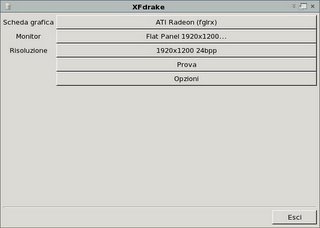
- Restart X

OpenOffice:
Urpmi --auto-select has installed OpenOffice 1.1.5 but Mandriva has the version 2.0, the package name is: openoffice.org-go-ooo
Note: Some days ago I installed the SUN's JRE, yesterday after the upgrade I had problem running OO with JRE installed, OO sucked all my cpu. I have removed JRE and now all is ok
That's all for now.
RJP
Sunday, October 30, 2005
Americas Army 2.5 - Linux
Hi folks,
yesterday icculus.org has released the final version of AmericansArmy v. 2.5 for Linux
The installer add the game to the Gnome menu ( should be the same for KDE but I don't use it so I can't say nothing ).
The game works perfect with the quite similar frame rate I have under Windows.
Have fun!
yesterday icculus.org has released the final version of AmericansArmy v. 2.5 for Linux
The installer add the game to the Gnome menu ( should be the same for KDE but I don't use it so I can't say nothing ).
The game works perfect with the quite similar frame rate I have under Windows.
Have fun!
Friday, September 16, 2005
ATI fglrx, Xorg and DRI
Today I have succesfully installed the ATI drivers on my Vaio.
You can find the ATI driver at this link:
https://support.ati.com/ics/support/default.asp?deptID=894&task=knowledge&folderID=27 and download the rpm version.
This is the main guide I have followed for the installation process:
http://www.linuxquestions.org/questions/showthread.php?threadid=361450
but with some adjustment.
First of all you must have installed the kernel source ( keep in mind that must be the same version that you are running )
I used urpmi to make the installation, in this way I can keep track of the rpm package in db.
Now make a copy of /usr/X11R6/lib/FGL.renamed.libGL.so.1.2 because this file create a conflict with the ATI's rpm and it'll be overwrite. Now you can start with the installation process:
# urpmi --allow-force fglrx_6_8_0-8.16.20-1.i386.rpm
say "y" for all the questions.
If all has gone well, run
# fglrxconfig
You can keep all the default settings, choose only you language ( keyboard layout ) and the resolution about 24 bit depth selecting ( 8632 ).
Then edit your /etc/X11/xorg.conf file, created by ATI and modify the Subsection "Display" adding the mode: 1920x1200. The Subsection should result in this way :
Subsection "Display"
Depth 24
Modes "1920x1200" "1600x1200" "1280x1024" "1024x768" "800x600"
ViewPort 0 0 # initial origin if mode is smaller than desktop
# Virtual 1280 1024
EndSubsection
In Section "Files", comment all the istances of FontPath and RgbPath then add this line:
FontPath "unix/:-1"
Note: This line indicates to xorg to use the xfs ( X font server )
save and restart the server.
This is the glxgears output:
9648 frames in 5.0 seconds = 1929.600 FPS
11474 frames in 5.0 seconds = 2294.800 FPS
12028 frames in 5.0 seconds = 2405.600 FPS
12018 frames in 5.0 seconds = 2403.600 FPS
12399 frames in 5.0 seconds = 2479.800 FPS
12614 frames in 5.0 seconds = 2522.800 FPS
12169 frames in 5.0 seconds = 2433.800 FPS
13676 frames in 5.0 seconds = 2735.200 FPS
14351 frames in 5.0 seconds = 2870.200 FPS
Done !
*** Keep in mind that there is no guarantee that this process works on your machine and it's at your own risk. ***
You can find the ATI driver at this link:
https://support.ati.com/ics/support/default.asp?deptID=894&task=knowledge&folderID=27 and download the rpm version.
This is the main guide I have followed for the installation process:
http://www.linuxquestions.org/questions/showthread.php?threadid=361450
but with some adjustment.
First of all you must have installed the kernel source ( keep in mind that must be the same version that you are running )
I used urpmi to make the installation, in this way I can keep track of the rpm package in db.
Now make a copy of /usr/X11R6/lib/FGL.renamed.libGL.so.1.2 because this file create a conflict with the ATI's rpm and it'll be overwrite. Now you can start with the installation process:
# urpmi --allow-force fglrx_6_8_0-8.16.20-1.i386.rpm
say "y" for all the questions.
If all has gone well, run
# fglrxconfig
You can keep all the default settings, choose only you language ( keyboard layout ) and the resolution about 24 bit depth selecting ( 8632 ).
Then edit your /etc/X11/xorg.conf file, created by ATI and modify the Subsection "Display" adding the mode: 1920x1200. The Subsection should result in this way :
Subsection "Display"
Depth 24
Modes "1920x1200" "1600x1200" "1280x1024" "1024x768" "800x600"
ViewPort 0 0 # initial origin if mode is smaller than desktop
# Virtual 1280 1024
EndSubsection
In Section "Files", comment all the istances of FontPath and RgbPath then add this line:
FontPath "unix/:-1"
Note: This line indicates to xorg to use the xfs ( X font server )
save and restart the server.
This is the glxgears output:
9648 frames in 5.0 seconds = 1929.600 FPS
11474 frames in 5.0 seconds = 2294.800 FPS
12028 frames in 5.0 seconds = 2405.600 FPS
12018 frames in 5.0 seconds = 2403.600 FPS
12399 frames in 5.0 seconds = 2479.800 FPS
12614 frames in 5.0 seconds = 2522.800 FPS
12169 frames in 5.0 seconds = 2433.800 FPS
13676 frames in 5.0 seconds = 2735.200 FPS
14351 frames in 5.0 seconds = 2870.200 FPS
Done !
*** Keep in mind that there is no guarantee that this process works on your machine and it's at your own risk. ***
Tuesday, September 13, 2005
Adding your service to the system:
put your init script in /etc/init.d with a top description like this:
# chkconfig: 2345 99 5
# description:
where the 2345 are the level in which you want the service on, 99 is the start order and 5 the stop.
chkconfig --add myservice
Then you'll be ablo to manage you service from the graphical system manager.
put your init script in /etc/init.d with a top description like this:
# chkconfig: 2345 99 5
# description:
where the 2345 are the level in which you want the service on, 99 is the start order and 5 the stop.
chkconfig --add myservice
Then you'll be ablo to manage you service from the graphical system manager.
Tuesday, August 23, 2005
Add media to urpmi
Keep in mind:
# man urpmi
# man urpmi.cfg
# man urpmi.addmedia
http://easyurpmi.zarb.org/ is very useful to help you in adding sites to you urpmi's media.
For example this is my /etc/urpmi/urpmi.cfg:
# generated Thu Sep 15 09:47:16 2005
{
}
Main\ (distrib1) ftp://bo.mirror.garr.it/pub/mirrors/Mandrake/official/current/i586//media/main {
hdlist: hdlist.Main (distrib1).cz
key-ids: 70771ff3
synthesis
with_hdlist: ../..//media/media_info/synthesis.hdlist_main.cz
}
Contrib\ (distrib2) ftp://bo.mirror.garr.it/pub/mirrors/Mandrake/official/current/i586//media/contrib {
hdlist: hdlist.Contrib (distrib2).cz
key-ids: 78d019f5
synthesis
with_hdlist: ../..//media/media_info/synthesis.hdlist_contrib.cz
}
Java\ Contrib\ (distrib3) ftp://bo.mirror.garr.it/pub/mirrors/Mandrake/official/current/i586//media/jpackage {
hdlist: hdlist.Java Contrib (distrib3).cz
key-ids: c431416d
synthesis
with_hdlist: ../..//media/media_info/synthesis.hdlist_jpackage.cz
}
update_source ftp://bo.mirror.garr.it/pub/mirrors/Mandrake/official/updates/10.2/main_updates {
hdlist: hdlist.update_source.cz
key-ids: 22458a98
list: list.update_source
update
with_hdlist: media_info/hdlist.cz
}
Installation\ CD1\ (2005\ LE\ Dischi\ 1) removable://mnt/cdrom/media/main {
hdlist: hdlist.Installation CD1 (2005 LE Dischi 1).cz
key-ids: 70771ff3
removable: /dev/hda
synthesis
with_hdlist: ../..//media/media_info/synthesis.hdlist1.cz
}
Installation\ CD2\ (2005\ LE\ Dischi\ 2) removable://mnt/cdrom/media/main2 {
hdlist: hdlist.Installation CD2 (2005 LE Dischi 2).cz
key-ids: 70771ff3
removable: /dev/hda
synthesis
with_hdlist: ../..//media/media_info/synthesis.hdlist2.cz
}
Installation\ CD3\ (2005\ LE\ Dischi\ 3) removable://mnt/cdrom/media/main3 {
hdlist: hdlist.Installation CD3 (2005 LE Dischi 3).cz
key-ids: 70771ff3
removable: /dev/hda
synthesis
with_hdlist: ../..//media/media_info/synthesis.hdlist3.cz
}
plf-free ftp://ftp.easynet.fr/plf/mandrake/free/10.2 {
hdlist: hdlist.plf-free.cz
key-ids: caba22ae
list: list.plf-free
with_hdlist: hdlist.cz
}
plf-nonfree ftp://ftp.easynet.fr/plf/mandrake/non-free/10.2 {
hdlist: hdlist.plf-nonfree.cz
key-ids: caba22ae
list: list.plf-nonfree
with_hdlist: hdlist.cz
}
# man urpmi
# man urpmi.cfg
# man urpmi.addmedia
http://easyurpmi.zarb.org/ is very useful to help you in adding sites to you urpmi's media.
For example this is my /etc/urpmi/urpmi.cfg:
# generated Thu Sep 15 09:47:16 2005
{
}
Main\ (distrib1) ftp://bo.mirror.garr.it/pub/mirrors/Mandrake/official/current/i586//media/main {
hdlist: hdlist.Main (distrib1).cz
key-ids: 70771ff3
synthesis
with_hdlist: ../..//media/media_info/synthesis.hdlist_main.cz
}
Contrib\ (distrib2) ftp://bo.mirror.garr.it/pub/mirrors/Mandrake/official/current/i586//media/contrib {
hdlist: hdlist.Contrib (distrib2).cz
key-ids: 78d019f5
synthesis
with_hdlist: ../..//media/media_info/synthesis.hdlist_contrib.cz
}
Java\ Contrib\ (distrib3) ftp://bo.mirror.garr.it/pub/mirrors/Mandrake/official/current/i586//media/jpackage {
hdlist: hdlist.Java Contrib (distrib3).cz
key-ids: c431416d
synthesis
with_hdlist: ../..//media/media_info/synthesis.hdlist_jpackage.cz
}
update_source ftp://bo.mirror.garr.it/pub/mirrors/Mandrake/official/updates/10.2/main_updates {
hdlist: hdlist.update_source.cz
key-ids: 22458a98
list: list.update_source
update
with_hdlist: media_info/hdlist.cz
}
Installation\ CD1\ (2005\ LE\ Dischi\ 1) removable://mnt/cdrom/media/main {
hdlist: hdlist.Installation CD1 (2005 LE Dischi 1).cz
key-ids: 70771ff3
removable: /dev/hda
synthesis
with_hdlist: ../..//media/media_info/synthesis.hdlist1.cz
}
Installation\ CD2\ (2005\ LE\ Dischi\ 2) removable://mnt/cdrom/media/main2 {
hdlist: hdlist.Installation CD2 (2005 LE Dischi 2).cz
key-ids: 70771ff3
removable: /dev/hda
synthesis
with_hdlist: ../..//media/media_info/synthesis.hdlist2.cz
}
Installation\ CD3\ (2005\ LE\ Dischi\ 3) removable://mnt/cdrom/media/main3 {
hdlist: hdlist.Installation CD3 (2005 LE Dischi 3).cz
key-ids: 70771ff3
removable: /dev/hda
synthesis
with_hdlist: ../..//media/media_info/synthesis.hdlist3.cz
}
plf-free ftp://ftp.easynet.fr/plf/mandrake/free/10.2 {
hdlist: hdlist.plf-free.cz
key-ids: caba22ae
list: list.plf-free
with_hdlist: hdlist.cz
}
plf-nonfree ftp://ftp.easynet.fr/plf/mandrake/non-free/10.2 {
hdlist: hdlist.plf-nonfree.cz
key-ids: caba22ae
list: list.plf-nonfree
with_hdlist: hdlist.cz
}
Friday, August 12, 2005
What is it supported ?
Monitor :
Wide screen 1920x1200 17" WUXGA X-black is very cool, no problems!
Dri not yet supported from xorg for my video card ATI Mobility Radeon X600 256 MB
Wireless:
WiFi:
Works but you have to install the ipw2200-firmware first.
You need to install the dhcp-client if your network has a dhcp-server.
Note: I have to activate the network interface to make it works. :-) these because I use Gnome and the network graphic tool seems to has some problem activating the interface on the fly.
Bluetooth:
Works.
Audio:
Alsa makes its jobs well. I had some trouble with the microphone, I don't know why but to make it works correctly I must open the mixer (Gnome or Kde) deselect Mic in, select another audio source and then reselect Mic.
At the beginning I had problems wyth Skype ( audio resource busy ) so I could not make multiple calls. At now it works very well and my resource in not busy any more.
As Multimedia System ( Gnome ) it's selected OSS.
Connections:
USB and i.Link work.
Card Dual Pro Reads:
It doens't work. No support at all.
Function Keys:
They don't work. I have followed the instruction on http://popies.net/sonypi/ but I think there is some problem with the kernel module, because dmesg reports this:
Sony Vaio Jogdial input method installed.
Sony Vaio Keys input method installed.
sonypi command failed at drivers/char/sonypi.c : sonypi_call1 (line 589)
sonypi command failed at drivers/char/sonypi.c : sonypi_call2 (line 600)
sonypi command failed at drivers/char/sonypi.c : sonypi_call2 (line 602)
sonypi command failed at drivers/char/sonypi.c : sonypi_call1 (line 589)
sonypi: Sony Programmable I/O Controller Driverv1.26.
sonypi: detected type2 model, verbose = 0, fnkeyinit = off, camera = off, compat = off, mask = 0xffffffff, useinput = on, acpi = on
sonypi: enabled at irq=11, port1=0x1080, port2=0x1084
However spicctrl works, in this way you can controll the brightness of you monitor by hand.
DVD/CD:
Works.
I'll find out a way to pint out all the info about hardware that Mandriva is able to identify.
Wide screen 1920x1200 17" WUXGA X-black is very cool, no problems!
Dri not yet supported from xorg for my video card ATI Mobility Radeon X600 256 MB
Wireless:
WiFi:
Works but you have to install the ipw2200-firmware first.
You need to install the dhcp-client if your network has a dhcp-server.
Note: I have to activate the network interface to make it works. :-) these because I use Gnome and the network graphic tool seems to has some problem activating the interface on the fly.
Bluetooth:
Works.
Audio:
Alsa makes its jobs well. I had some trouble with the microphone, I don't know why but to make it works correctly I must open the mixer (Gnome or Kde) deselect Mic in, select another audio source and then reselect Mic.
At the beginning I had problems wyth Skype ( audio resource busy ) so I could not make multiple calls. At now it works very well and my resource in not busy any more.
As Multimedia System ( Gnome ) it's selected OSS.
Connections:
USB and i.Link work.
Card Dual Pro Reads:
It doens't work. No support at all.
Function Keys:
They don't work. I have followed the instruction on http://popies.net/sonypi/ but I think there is some problem with the kernel module, because dmesg reports this:
Sony Vaio Jogdial input method installed.
Sony Vaio Keys input method installed.
sonypi command failed at drivers/char/sonypi.c : sonypi_call1 (line 589)
sonypi command failed at drivers/char/sonypi.c : sonypi_call2 (line 600)
sonypi command failed at drivers/char/sonypi.c : sonypi_call2 (line 602)
sonypi command failed at drivers/char/sonypi.c : sonypi_call1 (line 589)
sonypi: Sony Programmable I/O Controller Driverv1.26.
sonypi: detected type2 model, verbose = 0, fnkeyinit = off, camera = off, compat = off, mask = 0xffffffff, useinput = on, acpi = on
sonypi: enabled at irq=11, port1=0x1080, port2=0x1084
However spicctrl works, in this way you can controll the brightness of you monitor by hand.
DVD/CD:
Works.
I'll find out a way to pint out all the info about hardware that Mandriva is able to identify.
Wednesday, August 10, 2005
Choose the distro: Mandriva 2005 LE
At the time of my installation ( end of July 2005 ) only Mandriva 2005 LE has been able to detect my SATA HD . I have tried Debian (testing), Knoppix, Ubuntu without succes, probably now the situation could be better.
0) Backup all you data!
1) I have resized my disk partition for a dual boot with Windows XP SP2 and Linux.
Windows : sda1 - 27.0 GB - NTFS
Linux Swap: sda5 - 1.8 GB - Linux Swap
Linux Root: sda6 - 63.0 GB - ext3
I think you could make the same work with dedicated software.
3) Reinstall Windows following the Sony procedure
4) Start with the Mandriva 2005 LE.
4.1) Insert in your cd/dvd ( first disk )
4.2) Reboot the machine
4.3) Follow the instructions
4.4) Enjoy!
I have to say that the installation procedure of Mandriva has been one of the more easy that I have ever seen for a Linux distro.
0) Backup all you data!
1) I have resized my disk partition for a dual boot with Windows XP SP2 and Linux.
Windows : sda1 - 27.0 GB - NTFS
Linux Swap: sda5 - 1.8 GB - Linux Swap
Linux Root: sda6 - 63.0 GB - ext3
I think you could make the same work with dedicated software.
3) Reinstall Windows following the Sony procedure
4) Start with the Mandriva 2005 LE.
4.1) Insert in your cd/dvd ( first disk )
4.2) Reboot the machine
4.3) Follow the instructions
4.4) Enjoy!
I have to say that the installation procedure of Mandriva has been one of the more easy that I have ever seen for a Linux distro.
Subscribe to:
Posts (Atom)